

Quick answer: My UI/UX design process (the steps I follow from first call to handover) has five steps on every project: talk, research, plan, design and deliver. I never walk them in a straight line, because real projects don’t work that way. What changes is the plan and what I hand over: a live Framer site, a prototype and handoff, or documented design system parts.
What stays the same in every project?
I’m Dhiraj Ingle, a UI/UX designer and Official Framer Expert (I design how a site or an app looks and works). You might think a website, an app and a design system need three different ways of working. For me, they don’t. The five steps are the same every time.
Here are the five steps. Feel free to use them as a checklist for your own project.
Talk. We start with an intro call, then a discovery call (a longer call where I learn about your business).
Research. I look at the market, your competitors and your users.
Plan. I map the structure before I design anything.
Design. I set the look first, then I design the detailed screens.
Deliver. I build it, or I hand the design to the people who will.
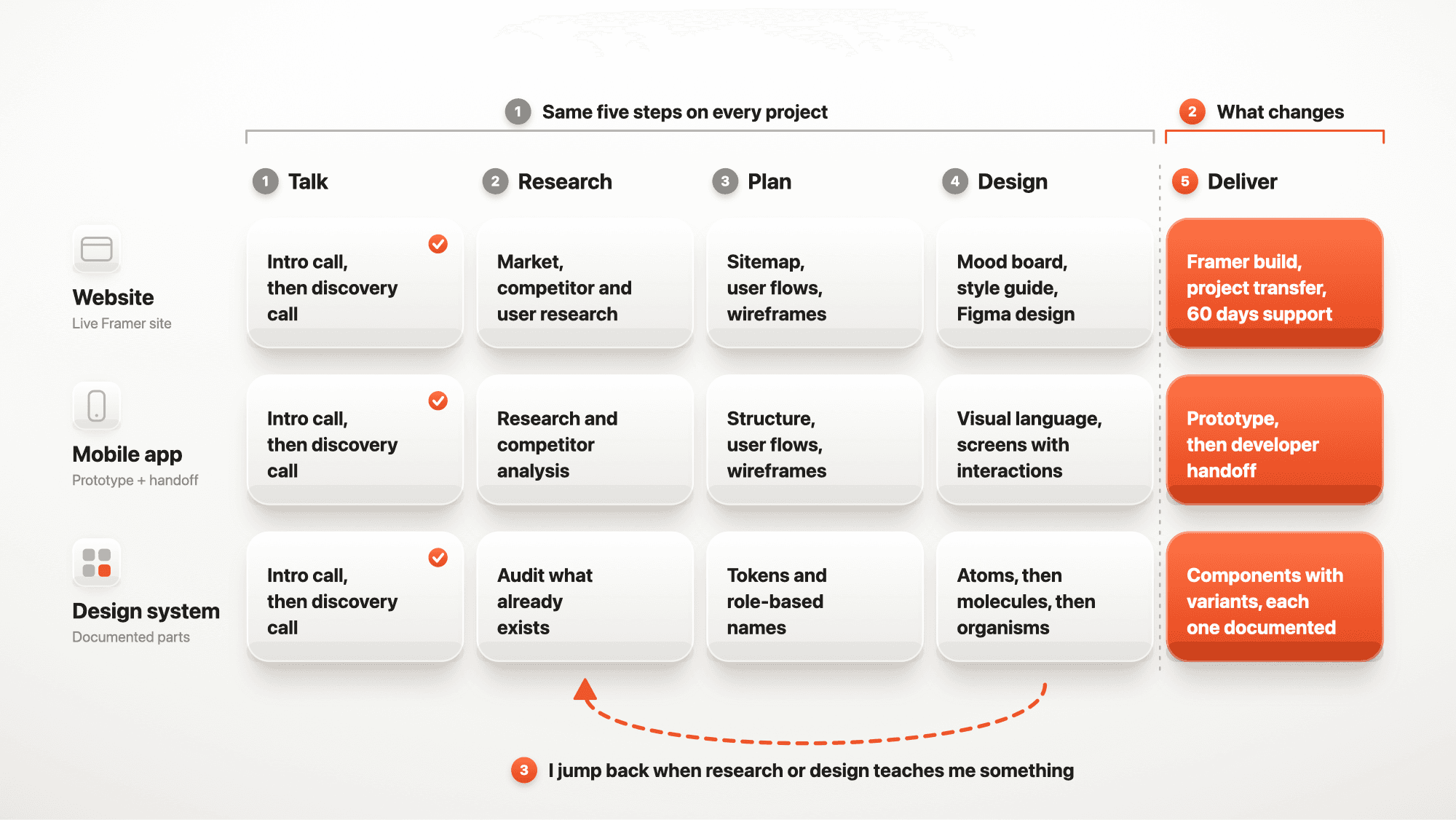
On paper, these steps look like a straight line. In real projects, they never are. Here’s why.
Is the design process a straight line?
No. A straight-line process never exists. Mine is more of a roller coaster. There are always jumps, and I go back and forth between the steps, depending on the project and the business goals.
Here’s what shaped me. I’ve worked on 17+ projects, and I understood that some things are not the right choice. Making every project fancy is one. Adding process you don’t need is another. So is following the exact methods you learn while studying UI/UX.
I also learn things while I design. I research each and every section to improve the UX. Sometimes that shows me something that changes a decision I made earlier, even one I made after user research. It happens after any kind of research. So I treat the five steps as a map, not a fixed track.
How does my process change for a website?
Let’s start with a website. First I plan it with a sitemap (a list of pages), user flows (the paths visitors take) and wireframes (quick page sketches). Then I show you a mood board (a collage of inspiration), so you can see the direction before I start designing. After that I set a style guide (your colours and text styles) and design the screens in Figma (a design tool). Then I build the site in Framer (a website builder).
I design the breakpoints (the screen sizes where the layout changes) right inside Framer. Not a lot changes between them, and it’s faster to design and build together. Most websites take me about 4 to 6 weeks. When we’re done, I transfer the Framer project to you, and you get 60 days of support.
If you want every step in detail, read Figma to Framer Workflow: 8 Steps From Call to Launch.
How does my process change for a mobile app?
An app is different, because there’s no website to build. The final result is a design that developers can build from. Here’s what changes:
Research. I do research and competitor analysis (a study of similar apps).
Plan. Before I design a single screen, I map the full structure and the user flows.
Design. I build the visual language (the look of the app), then I design each screen with its interactions.
Deliver. I make a prototype (a clickable model of the app) and a developer handoff (the files and notes developers build from).
Apps can have a lot more screens than websites. My Travel App has more than 100 screens. My Social Media App has more than 150 screens with interactions. On the Travel App, I designed two connected flows: discovery and planning.
What changes for an iOS app?
For an iPhone app, I follow Apple’s Human Interface Guidelines (Apple’s design rules for apps). They guide how navigation, buttons and text behave, so the app feels familiar to anyone who uses an iPhone. Android has its own rulebook, called Material Design (Google’s design rules). I know both.
MindEase is my iOS app concept for older adults. The sessions are short, the navigation is clear and the touch targets are large, so there’s no learning curve. For my Spaces concept for Apple Vision Pro, I used existing Vision Pro conventions (familiar patterns), so people don’t have to learn anything new.
How does my process change for a design system?
A design system (a shared set of styles, parts and rules) comes before the pages. I build the small parts first, and then I build the pages from them. That idea is called atomic design (building from small reusable parts), and it comes from Brad Frost. I use a lot of its principles in my design systems.
Naming is a good example. I name every style by its role, not by its size. Right now I mostly follow the naming terms from Apple’s Human Interface Guidelines, like Body, Headline, Title and Caption. Here’s my checklist:
Audit what exists. I list the styles and parts a product already uses.
Set variables and tokens (saved values for colours, sizes and fonts) in Figma from the start.
Name every style by its role, like Body or Headline, not by its size. I wrote more about this in How To Build a Typography System for Digital Products.
Think in five levels: atoms, molecules, organisms, templates and pages.
Make one component with many variants (versions of it), not many similar components.
Document every component for the developers.
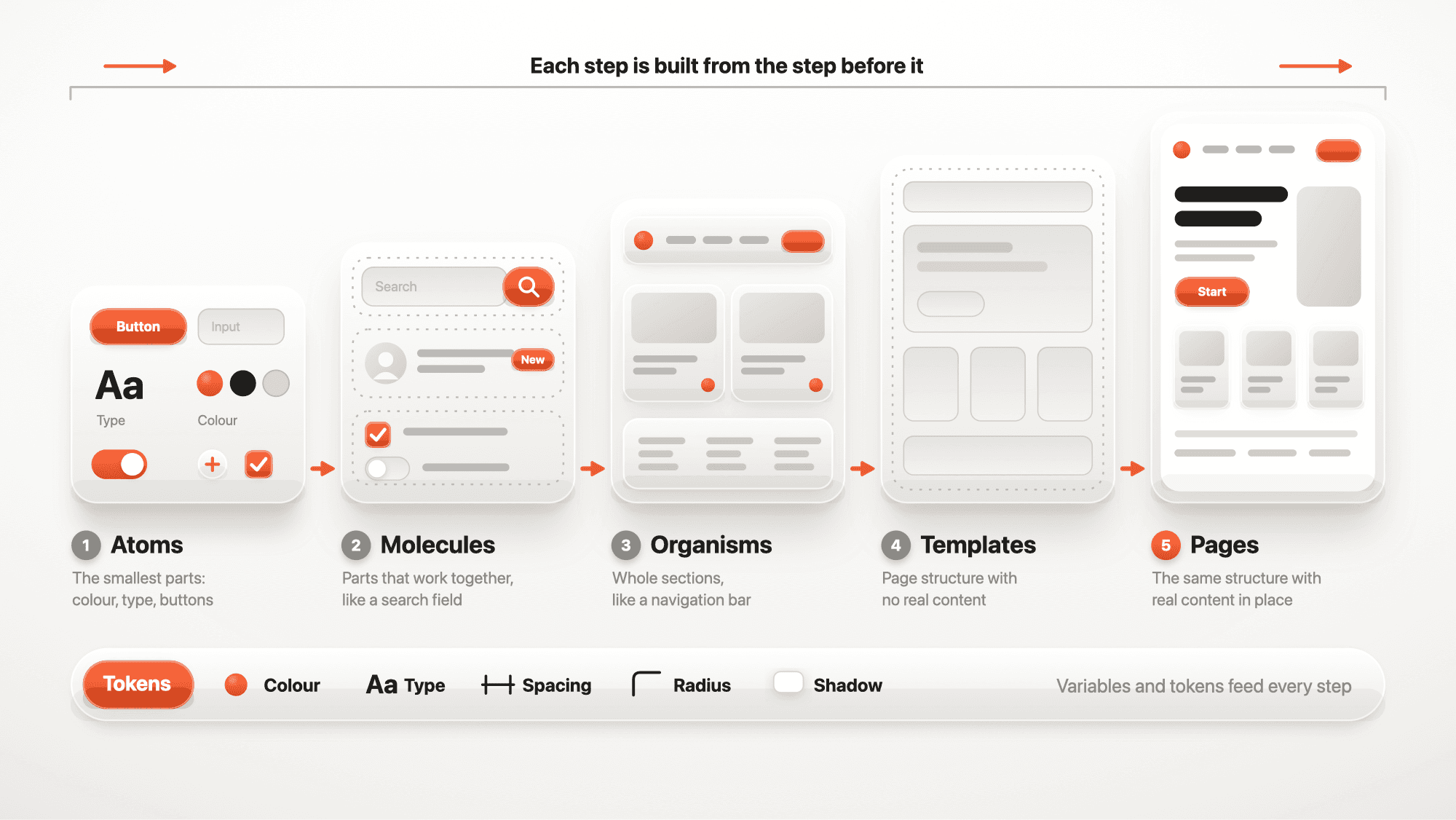
Atoms are the smallest parts, like a button or a colour. Molecules are small groups of atoms, like a search field. Organisms are whole sections, like a navigation bar. Templates show the page structure with no real content. Pages are the templates with real content in place.
The design system for my Travel App covered navigation, cards, search, date pickers, itinerary building and user profiles. It came in light and dark mode.
What do you get at the end of each project?
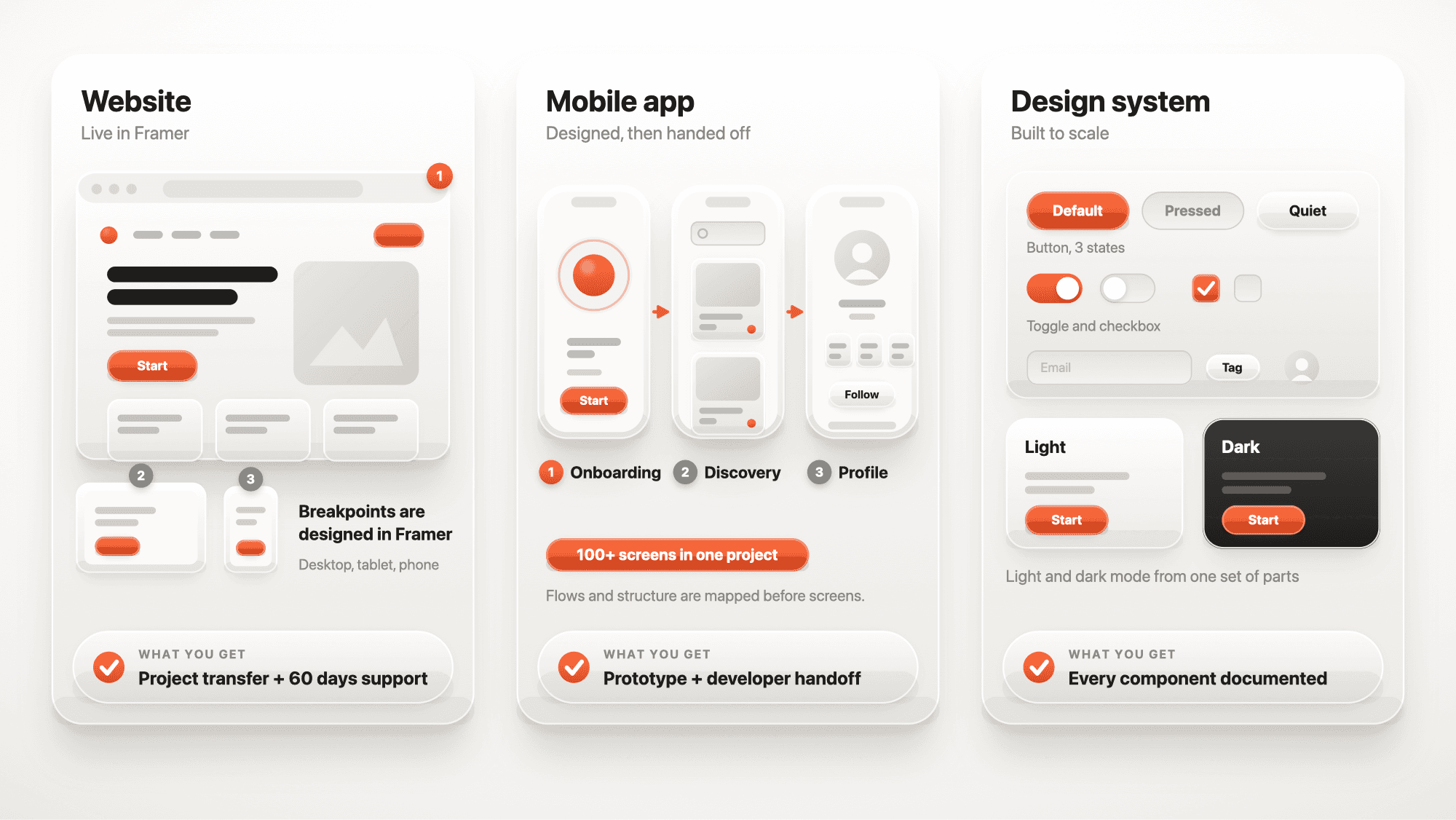
A website: a live Framer site, a project transfer and 60 days of support.
A mobile app: a prototype and a developer handoff.
A design system: every component documented for developers.
What matters most in every project?
Explaining my decisions. Decisions can change later, so I explain each one to the client or the stakeholder (a person with a say in the project). I want it to make sense to them too.
As a designer, that’s part of my job. I explain my decisions so our thoughts line up. That way, the client understands the work better. Try this: after your next big design decision, write one sentence on why you made it, and share it with your client.
FAQ: my design process
Do you use the same process for every project?
I use the same five steps every time. But I never walk them in a straight line. I go back and forth, depending on the project and the business goals. The plan and the handover change too.
Do you build the apps you design?
No. I design the app and hand it to developers. I build websites in Framer.
Which tools do you use?
For websites, I design in Figma, build in Framer and track the work with you in Notion (a planning app). For design systems, I set variables and tokens in Figma.
Where do you start a design system?
I list what already exists. Then I set variables and tokens, build the smallest parts first, and build the bigger parts from them.
How long does a project take?
A website usually takes 4 to 6 weeks. An app depends on its size. My Travel App has more than 100 screens, and my Social Media App has more than 150.
Ready to work this way?
Want this process on your project? Book a free intro call and let’s talk.

